Mini-WMS
API access to the Shopify, Amazon & Ebay websites.
Below are the details on how to aquire the API access token and credential from the above platforms.
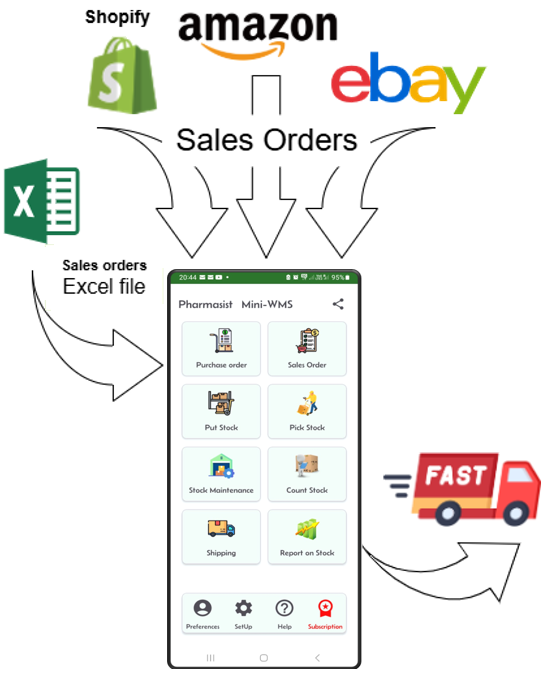
Extracting new orders to process from your Shopify store
To successfully import orders and their items, ensure the Shopify SKU field for each product matches the item number in your mini-WMS app.
Shopify Integration Requires:
- Your Shopify store URL. (e.g., https://xxxxx-x.myshopify.com).
- Your Shopify API access token. (e.g., shpat_xxxxxxxxxxxxxxxxxxxxxxxxxxxxxxxxx).
Steps to create the access token: Log in to Shopify Admin: Go to your Shopify store admin panel.
Navigate to Apps: In the left-hand menu, click on Apps.
Develop Apps: Click on Apps and sales channel settings. A new page will open. Click on Develop Apps and choose to allow custom apps.
Create New App: Click on the Create an App button and enter the app name.
Configure API Scopes: Select the following permissions:
Customer read only. Fulfillment read only. Orders read only. Install the App: Once configured, click Save. After saving, click Install app and confirm the installation if prompted.
Generate API Access Token: After installation, go to the API credentials section. Click Reveal token once to view your Admin API access token. Copy this token and use it in the Setup → Systemctrl screen of your app.
Store the Token Securely: Make sure to store the access token securely as it provides access to your Shopify store. This is a one-time process and does not need to be repeated.
Extracting new orders to process from your Amazon store
To successfully import orders and their items, ensure the Amazon SellerSKU field for each product matches the item number in your mini-WMS app.
Amazon Integration requires:
- Your Amazon Marketplace set to the country where you are located.
- Your Amazon Client ID.
- Your Amazon Client Secret.
- Your Amazon Refresh Token.
Steps:
-
Register on Seller Central:
For the UK, visit https://sellercentral.amazon.co.uk. -
Navigate to Apps & Services:
In the top-left menu, select Apps & Services and choose Develop Apps. -
Complete Your Profile:
Fill in all required information and answer all questions. Answer Yes for all security-related Yes/No questions. - Developer Registration Review:
Your registration will be under review. You won’t be able to add new application clients until the review is complete.- You should receive a response within minutes if successful.
-
Add a New App Client:
Once approved, click Add new app client, provide a name, and specify what you want to access. Answer No to the “Restricted Data Token” question. -
Retrieve LWA Credentials:
Click on LWA Credentials, and copy the Client Identifier and Client Secret. - Authorize the App:
In the Action column, select Authorize from the Edit App dropdown.- A new page called Manage Authorization will open.
- Click Authorize App.
-
Retrieve Refresh Token:
Once authorized, a Refresh Token will appear. Copy and store it securely. -
Use the Correct Marketplace ID:
Ensure you select the appropriate Marketplace ID for the country you are operating in. - Update Amazon fields in the App’s System parameters screen:
Use the Marketplace ID from step 9. then Client ID & secret from step6. then refresh token from step 8. and populate the Amazon fields in the system parameter screen.
Extracting new orders to process from your eBay store
To successfully import orders and their items from your Ebay shop, ensure the eBay SKU field for each product matches the item number in your mini-WMS app.
eBay Integration requires:
- Your eBay OAuth API access token.
Steps to get the OAuth Token for eBay:
-
Log in to eBay Developer Program:
Visit the eBay Developer Program and sign in with your eBay account. -
Create or Select an eBay Application:
Navigate to the Dashboard, and either create a new application or select an existing one. - Get OAuth Credentials:
In the application settings, locate the OAuth credentials section.- Copy your Client ID and Client Secret, which are required to generate the OAuth token.
- Generate the OAuth Token:
- Go to the User Tokens tab.
- Select the appropriate scopes (permissions) for your app by checking the relevant boxes.
- Click Get OAuth Access Token.
- Authenticate and Authorize:
- You will be redirected to eBay’s authorization page.
- Log in with the eBay account you wish to authorize.
- Grant the required permissions to your application.
- Copy the OAuth Token:
- After authorization, you will receive the OAuth token.
- Copy this token for use in your application.
Note: Token Expiry
The OAuth token is short-lived and valid for approximately one hour.
To streamline the process:
- Log in to the eBay Developer site on your smartphone.
- Repeat Steps 4 & 5 whenever you need a new token to download new slaes orders.
- Copy the token and update the “Ebay API OAuth token” field in the System Parameters screen of your app.
- Once updated, you can fetch your eBay orders.